SaaS Video Marketing November 11, 2026
SaaS Demo Video Review Checklist: Four Approval Gates
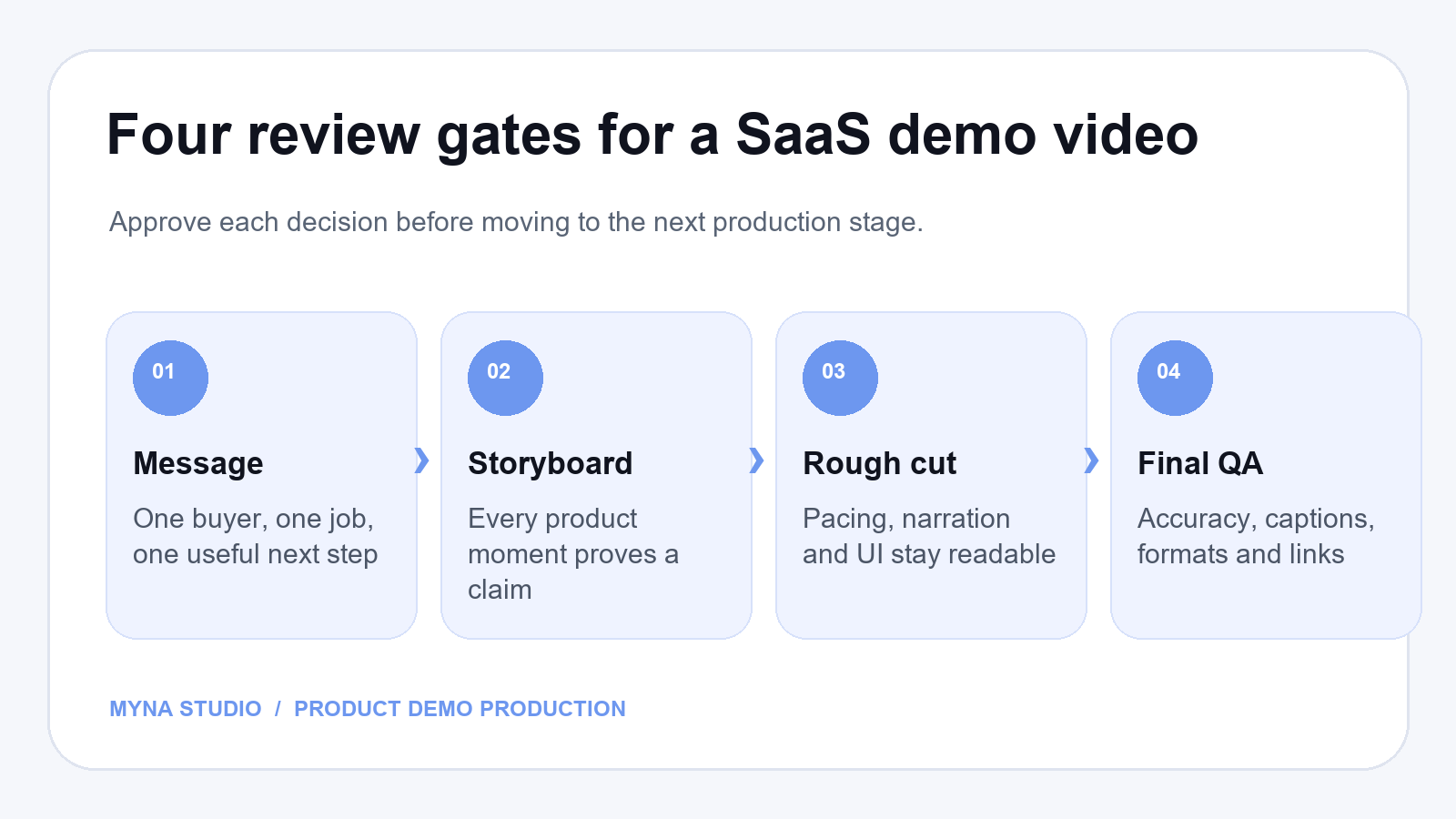
A SaaS demo video review checklist should test four decisions in order: whether the message fits one buyer, whether the storyboard proves that message, whether the rough cut is easy to follow, and whether the final file is accurate and ready for its destination. Review in that order so the team does not spend time polishing scenes that should be removed.
A product marketer may see a clear story while a product manager spots an outdated screen. A sales lead may like the pacing but find that the next step is unclear. This guide gives each reviewer a specific job and a sensible moment to weigh in. It is a planning framework, not a claim that any one video will produce a particular revenue result.
Before review begins: agree on the job of the video
Write down the viewer, the product task, the intended placement, and the action you want after viewing. “Show the platform” is too broad. “Help an operations lead understand how a request moves from intake to approval” gives the team something testable. If this decision is still open, start with our SaaS product demo planning guide before reviewing frames.
- Primary viewer: Who should recognize their own situation in the opening?
- One useful outcome: What should that viewer understand or be able to evaluate afterward?
- Proof moment: Which real product action makes the promise credible?
- Placement: Will this sit on a landing page, in a sales follow-up, or in a launch campaign?
- Next step: What should the viewer do when the film ends?
Gate 1: approve the message and script
At the script stage, review meaning rather than animation. Read the narration aloud. Can someone unfamiliar with the product repeat the problem, the change your product makes, and the next step? If a sentence needs an internal acronym explained, rewrite it before recording voiceover.
Ask one person to own the final message. Product, sales, and legal can flag inaccuracies or risky promises, but a long chain of independent edits can turn a focused story into a feature list. The SaaS product demo video script template can help reviewers see how each line supports a visual and an outcome.
Script sign-off questions
- Does the opening identify a problem the target buyer recognizes?
- Does the video show one coherent workflow instead of unrelated features?
- Are benefit claims supported by what appears on screen?
- Is the call to action specific and appropriate for the viewer’s stage?
Gate 2: approve the storyboard and product proof
A storyboard is where the spoken idea meets the screen. For each scene, ask what the viewer learns and what visual evidence carries that lesson. A decorative transition may be attractive, but it should not replace the one interface moment a buyer needs to see.
Have a product owner check the proposed UI states, labels, sample data, and sequence of actions. Mark anything that might change before launch. Approving a storyboard that depends on an unstable screen can create avoidable rework later. Our scene-by-scene storyboard template gives reviewers a way to evaluate each beat before motion begins.
Storyboard sign-off questions
- Can the viewer follow the task without reading every label?
- Is the interface recognizable and accurate enough to build trust?
- Is important data safe to show, including names, account details, and notifications?
- Does every scene earn its place in the story?
Gate 3: review the rough cut on a real screen
The rough cut is the moment to judge pace, clarity, and attention. Watch once without pausing, then watch again with notes. If the viewer cannot tell where to look, a longer pause, crop, callout, or simpler frame may help more than another line of narration.
Review on a phone as well as a desktop screen, especially when the video will be used in social or paid placements. Check whether captions and interface details remain readable at the actual display size. Gather comments in one place and label each as factual correction, comprehension issue, or preference. That makes the next revision more useful.
Rough-cut sign-off questions
- Is the main product action visible long enough to understand?
- Do voice, captions, and motion agree rather than compete?
- Does the opening earn attention without hiding the product for too long?
- Would someone watching without sound still understand the core idea?
Gate 4: complete final delivery QA
Before publishing, confirm the version against the approved script and current product. Test the file where it will actually live. A polished export can still fail because the thumbnail is unclear, the captions overlap the player, the mobile crop hides a button, or the linked call to action points to the wrong page.
- Check product names, UI labels, prices, and claims against current source material.
- Play the complete video with sound and with captions.
- Open each aspect ratio at its intended size; inspect the first and last frames.
- Verify the thumbnail, page embed, playback controls, and CTA link.
- Keep the approved master and source files identifiable for future product updates.
If a launch date is fixed, allow room for these checks in the schedule. The SaaS video production timeline explains why sign-off points belong in the plan rather than at the end.
A simple way to collect feedback
Use one shared review document with the timecode, issue, requested change, and reviewer. Ask the decision owner to combine conflicting comments before sending them to the production team. “This feels slow” is hard to act on; “at 0:24, hold the completed dashboard for one more beat so the result is readable” gives a clear test.
For the next version, compare the actual change with the original concern. Avoid reopening approved strategy because a color or transition changed. If the product itself has changed, treat that as a new accuracy decision and state it explicitly.
Frequently asked questions
Who should approve a SaaS demo video?
Give one person final responsibility for the story. Ask product to confirm the workflow, marketing to confirm audience and placement, and legal or compliance to review any claims that require their approval. Each reviewer should know which decision they own.
When should the script be locked?
Lock the core message before full animation begins. Small wording edits may remain possible later, but a new audience, outcome, or workflow usually changes the storyboard and should be discussed as a scope change.
How often should a published demo video be reviewed?
Review it when the interface, positioning, pricing, or CTA changes. A short accuracy check after a major product release can prevent an otherwise useful video from showing an outdated experience.
Need a second set of eyes on your product story?
If your team has a script or rough cut and wants to make the buyer journey clearer, talk with Myna Studio about your SaaS video. Share the intended viewer, the workflow, and where the video will appear so the conversation can focus on the right decisions.
By Myna Studio Editorial Team